
How to stop songs repeat in iOS 10
I use iPhone 6Plus recently upgraded to iOS 10. It feels terrible for songs in the Music to be in continuous play. How can I stop songs repeating?
iPhone 6 Plus, iOS 9.0.1
I use iPhone 6Plus recently upgraded to iOS 10. It feels terrible for songs in the Music to be in continuous play. How can I stop songs repeating?
iPhone 6 Plus, iOS 9.0.1
For others reading this. First select the song like you are going to play so you see the album art but you don’t have to hit play. ( You May have to tap the song on the bar near the bottom.) Then swipe the album art up. Then you will find repeat right below the album cover.
For others reading this. First select the song like you are going to play so you see the album art but you don’t have to hit play. ( You May have to tap the song on the bar near the bottom.) Then swipe the album art up. Then you will find repeat right below the album cover.
This was painful to figure out. I don't know why it has to be so complicated and the interface has to change with every OS update.
On the iPad, it looks nothing like what's in the OP. You have to swipe up on the playlist, but it only works in a certain view and I don't even know how to describe it. I spent more than an hour just swiping this way and that, randomly guessing at which series of magical gestures would do the trick. Finally found the shuffle and repeat buttons - hugely oversized and then hidden off screen, so you have to swipe up to see them.
Thank you! Apple sure can make it hard to find controls sometimes!!
I agree that Apple makes things complicated. Wish they would issue instructions when they do these things!!
this is the best answer yet, thank you so much, was driving me madddddddd
wrong
swipe from mid-screen
I can not find it???? So frustrating !! When I'm in my car wanting to listen to an album it's quite dangerous to change it manually....fix this on the next update apple or I will not buy your next phone!!!
Thanks so much. I was going crazy. The format before was way more user friendly. Tried to stay away from ios10 until my digitizer on my 6 went completely digital. I had to upgrade to a 7 and iOS 10 was already installed. Started from the bottom now I'm here....
This was also driving me nuts! I tired the photo example - rolled the screen up (using finger in middle screen), but it did not show the repeat/shuffle options..😠
To resolve this i deleted next songs - then repeated the above exercise and whollah... it showed the repeat/shuffle options. my repeat was bright red for active - i touched it and it went pale for option off.. Then repeat ceased amd i could again enjoy an entire album on normal play mode. hurrah... 🙂
***?? So many suggestions yet none of them actually work. Does anyone from Apple actually scan these conversations and provide answers? How is something so simple so hard? There is literally NO easy way to find the stop repeat button.
I was having a frustrating time with songs repeating on my iPhone.I finally found your post and it solved my issue.You explained it so clearly.I hope you see this message as I realize your posting is older.You made my day! Thanks so much
I finally found the options. After swiping up from a little up from the bottom of the screen, I scrolled up on the following page. I fee dumb for not having had scrolled up before.
Hello Adeyeye,
Thank you for using Apple Support Communities. It's my understanding you're needing help stopping songs from repeating in Apple Music. I listen to Apple Music daily, I surely understand how important it is to have access to playing options. I am happy to help.
Please use the steps and image below for further assistance.
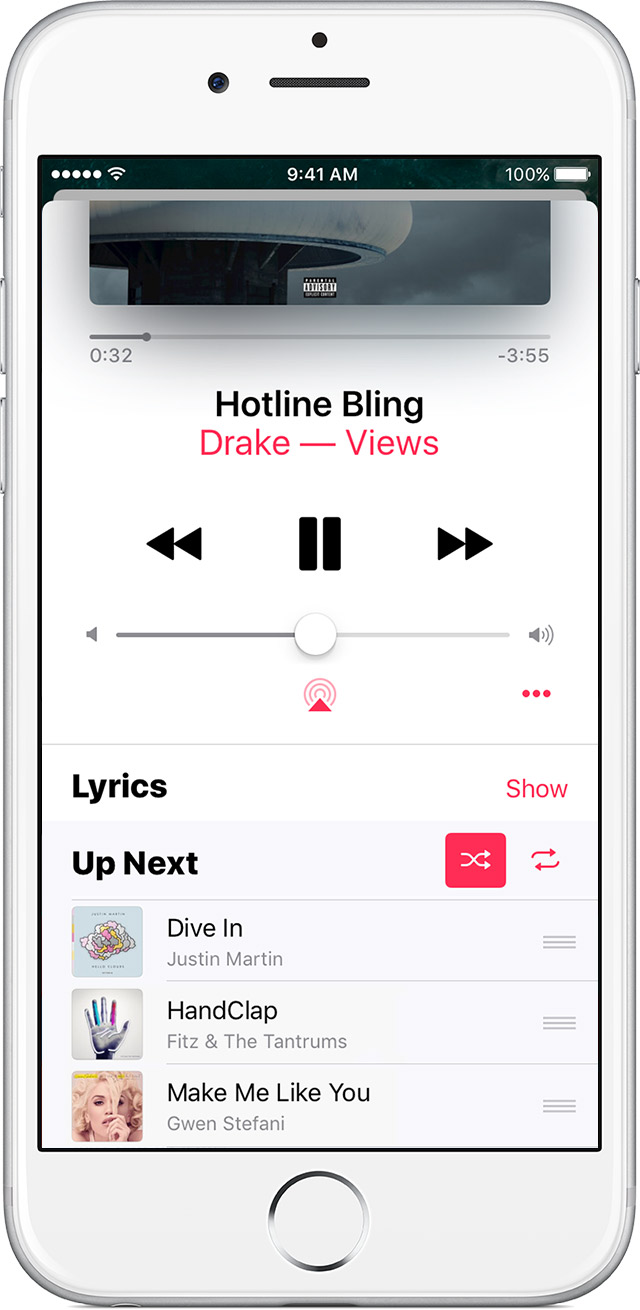
Up Next, Shuffle, and Repeat
Also on the Now Playing screen, you can rewind, pause, or fast forward a song, control the volume, read song lyrics, and more.
Swipe up on Now Playing to show your Up Next queue, which lists all of the songs that you’ve selected for playback.
Drag songs with
to rearrange the order, or swipe left to remove a song that you’d like to skip.
Tap
to the right of Up Next to shuffle the songs in a playlist or album.
Tap
once to play an entire playlist or album on repeat or twice to repeat one song. Tap
If you have repeat turned on, you might not see
Use Apple Music in the Music app
Have a great day!
No, this is not the case. Where are those options?
I had the same issue, slide your finger up from the bottom to reveal the other options. :D
How to stop songs repeat in iOS 10




